Karen — AI Receptionist
Helps prepare customer enquiry responses, answer common questions and organise booking information.
ANNIE AI BY SETUP WITH ANNIE
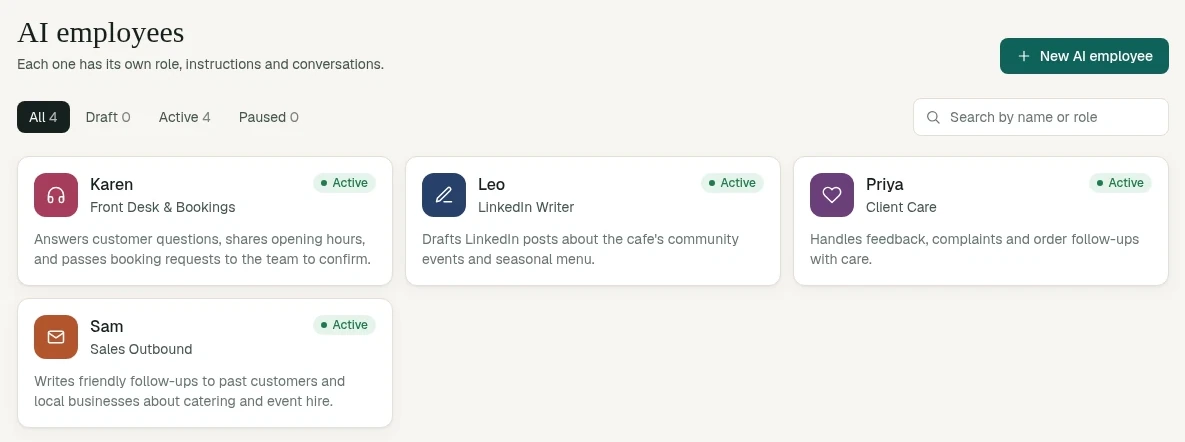
Running a business means wearing many hats. Annie AI helps you create your own team of AI assistants to support sales, customer enquiries, content creation and everyday business tasks.
Build your AI employees: free video tutorials on YouTube.
Give each assistant a name, a role and personalised instructions. Then start working together from your own private dashboard.
No coding. No complicated setup.
Annie AI is currently available in early access.
Every day brings another list of responsibilities.
Customer enquiries need answers. Sales messages need writing. Clients need follow-ups. Social media needs content.
For small business owners, hiring additional staff isn't always practical.
Annie AI gives you a flexible way to create specialised AI assistants for the work you need help with.
MEET YOUR AI EMPLOYEES
Helps prepare customer enquiry responses, answer common questions and organise booking information.
Helps develop outreach strategies, draft personalised sales messages and prepare prospect research.
Helps draft customer updates, follow-up messages and aftercare communications.
Helps write professional LinkedIn posts, business updates and engaging content.
These are examples of assistants you can configure. Customers can create their own roles and instructions.
Sign up and access your own private Annie AI workspace.
Choose a name, define a role and provide instructions explaining how you want the assistant to help.
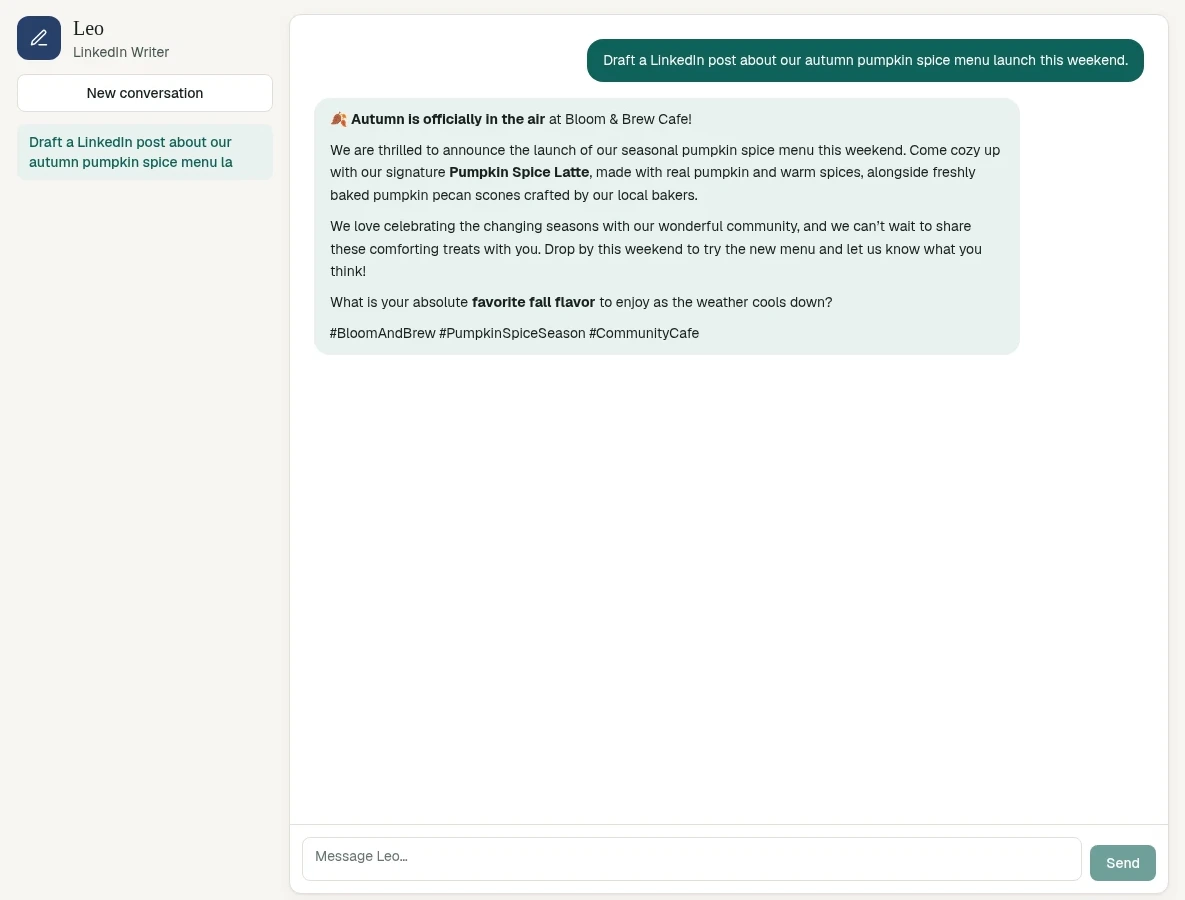
Open a conversation, ask your assistant to help with a task and return to your saved chat history whenever you need it.
Create assistants with different names, roles and responsibilities.
Tell each assistant how to respond and what work it should focus on.
Return to previous chats and continue your work.
Manage your assistants within your own business account.
A straightforward interface designed for everyday business owners.
Get help drafting, planning, brainstorming and preparing business content.
For business owners who want to create and manage their own AI assistants.
For business owners who want personalised support designing and configuring AI solutions.
Annie AI is evolving. Planned features include:
Annie AI is currently in early access while we continue developing the platform.
Create your workspace, explore the AI employee builder and discover how AI assistants can support your business.
Get Started With Annie AI Sign inFeatures, availability and usage limits may change during early access.
FAQ
Annie AI is a business software platform that lets you create and manage AI assistants with customised roles and instructions.
No. You can create AI employees without coding.
Yes. You can create assistants for different business responsibilities, subject to applicable account limits.
Yes. Conversation history is saved so you can return to previous discussions.
Not currently. Annie AI can help prepare content and responses. Additional integrations and automation capabilities are being developed.
Annie AI is currently offered in early access. Any future subscription plans and usage allowances will be communicated clearly before charges apply.
Annie AI uses separate customer workspaces and access controls. Customers should review the privacy information and avoid entering sensitive or confidential data unless the service explicitly supports it.
Yes. We offer separate consultancy and setup services for businesses wanting personalised assistance.
You don't need to do everything yourself.
Create your own AI employees and start working smarter with Annie AI.
Create Your AI Workspace Sign inAnnie AI — built by Setup With Annie.
Free AI Starter Kit
Join the newsletter and get the free kit: safe-use rules, starter prompts and a one-week checklist. Unsubscribe any time.
Questions about Set Up With Annie
AI assistant, answers may not be perfect. Please don’t share personal details. Privacy